Best 27-Inch Monitors: BenQ, Samsung and ASUS Compared
October 27, 2026
Picking a 27-inch monitor now means choosing between two very different kinds of screen. One is a 5K creative display.
Picking a 27-inch monitor now means choosing between two very different kinds of screen. One is a 5K creative display. The other is a 1440p OLED gaming panel that refreshes 480 to 500 times a second. Three monitors in this guide span that range, with prices from $679.99 to $999.99, and the spec sheets look nothing alike. A buyer who reads only the headline numbers can easily pay for sharpness they never use or speed they cannot see.
This guide is for anyone shopping for a 27-inch monitor right now. It covers the BenQ MA270S, the Samsung Odyssey OLED G6 G60SF and the ASUS ROG Swift PG27AQDP. We compare them on resolution, refresh rate, brightness, color, connectivity and price. We also say plainly who each one is for, because the BenQ and the two OLEDs are built for different jobs.
Why You Can Trust This Guide
Revuzia does not take paid placement, and manufacturers do not get favorable coverage in exchange for review units. Every monitor is evaluated against the same checklist: native resolution and refresh rate, response time, peak brightness, color gamut coverage and accuracy, input and port selection, stand adjustability, build quality, and the care features that matter for each panel type.
The numbers come from three layers. First, published measurements from independent test labs, such as colorimeter readings for gamut coverage and Delta E, and photometer readings for brightness and display lag. Second, manufacturer spec sheets and retailer listings. Third, the hands-on impressions of reviewers who lived with these monitors for days or months. When a manufacturer claim and an independent lab result disagree, we report both and rely on the lab figure.
Spotted an error, or want us to look at a monitor we missed? Email [email protected].
Our Top Picks at a Glance
Best Overall: ASUS ROG Swift PG27AQDP
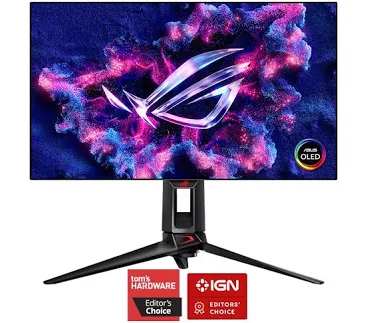
At $679.99, the ASUS is the least expensive monitor here. It is billed as the world's first 1440p 480Hz OLED, and it earns the top spot and our budget pick because it puts that 480Hz OLED speed at the lowest price of the three. Its shopper rating is 4.3 out of 5 from 107 reviews.
Who it's for. This is for the gamer who wants a fast 1440p OLED for the least money. At 480Hz it sits just below the Samsung's 500Hz, a gap that is marginal in practice.
Pros
- A 480Hz refresh rate at 1440p on an OLED panel
- The lowest price of the three at $679.99
Cons
- The lowest shopper rating of the three, at 4.3/5 from 107 reviews
- 480Hz is slightly slower than the Samsung's 500Hz
Best for Bright Rooms and Color Accuracy: Samsung Odyssey OLED G6 G60SF
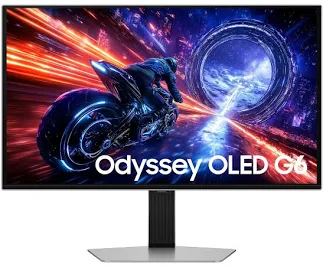
The Samsung is a very close second overall. It pairs the fastest panel here, a 500Hz refresh rate at 2560 x 1440, with strong verified color numbers. Independent lab testing recorded 99.5% DCI-P3 coverage and an average Delta E of 1.13 against a Display P3 profile. That is accuracy a creative professional would be happy with, on a monitor built for esports.
Key specs. It is a 27-inch QD-OLED with a stated 0.03ms GTG response time and VESA DisplayHDR TrueBlack 500 certification. Reviewers measured 93.5% Adobe RGB coverage and 329 nits peak SDR brightness on a 5% window. In HDR, peak brightness rose from about 540 nits with the setting off to 1,020 nits at High, and the Medium setting held just under 800 nits up to roughly a 10% window. Inputs are two HDMI 2.1, one DisplayPort 1.4, a headphone output, and a USB-B upstream feeding two USB-A ports. The stand offers 120mm of height adjustment, tilt, swivel and portrait rotation.
Who it's for. This is the pick for a gamer who also edits photos or video, and for anyone whose desk sits in a bright room. The matte surface suppresses reflections far better than a glossy panel. At $699.99 it is priced only $20 above the ASUS, which makes it an easy upgrade for the right buyer.
Pros
- 500Hz at 1440p with a stated 0.03ms GTG response time
- 99.5% DCI-P3 coverage and a Delta E of 1.13 in independent testing
- HDR peaks of roughly 800 nits at Medium and 1,020 nits at High
- Matte QD-OLED surface that handles bright rooms, plus a sturdy aluminium-backed build and stable twist-lock base
Cons
- No USB-C, and the reviewed sample had loose ports with some internal plastic flex
- The matte layer lifts black levels with a reddish tinge in bright rooms; full OLED contrast appears once the lights go down
- Reaching 500fps takes a very powerful CPU and GPU, and one forum user reported coil whine
Best for Mac Users and Creatives: BenQ MA270S
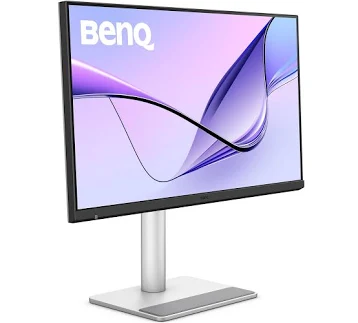
The BenQ plays a different game. At 5120 x 2880 on a 27-inch IPS panel, it packs about four times the pixels of the 1440p OLEDs. Text and fine detail look noticeably cleaner, which matters for people who read, write, code or retouch for a living. At $999.99 it is also the most expensive of the three, and it has the highest shopper rating at 4.8 out of 5.
Key specs. The Nano Gloss glass gives a glossy, Studio-Display-style finish with sharp bezels. Independent testing measured peak SDR brightness at 387.4 nits, and the reviewer called it the brightest third-party monitor they had tested. Connectivity is the standout: a Thunderbolt 4 input with 96W power delivery, a Thunderbolt 4 output, a daisy-chain port, two HDMI 2.1, a USB-C DisplayPort Alt Mode port and several USB-A and USB-C downstream ports. Eye Comfort 3.0 and flicker-free certifications are included, and a reviewer reported no eye fatigue after eight straight hours. Refresh is 70Hz.
Who it's for. Mac owners and creative professionals who want one cable to charge and connect a laptop. Mac color tuning and brightness and volume sync work through the free Display Pilot 2 app. Every cable is in the box, and the ports point up and over the top so cables stay out of sight.
Pros
- 5K sharpness at 27 inches (5120 x 2880)
- Thunderbolt 4 with 96W charging, plus daisy-chain and two HDMI 2.1 ports
- 387.4 nits measured SDR brightness and Eye Comfort 3.0 certification
- Deep macOS integration and all cables included
Cons
- 70Hz means it is a poor fit for fast gaming
- Built-in speakers are only passable; reviewers advise headphones or an external speaker for real listening
- No hotkey puck, and the glossy panel can pick up reflections in a high-glare room
How We Chose
We started from what a 27-inch monitor buyer actually does at a desk: reading text, editing, gaming and connecting a laptop or console. Each monitor was scored on resolution and pixel density, refresh rate and response time, brightness, color coverage and accuracy, connectivity, ergonomics and price against what it delivers.
We lean on independent lab data wherever it exists. The Samsung has a full set of lab figures.
Brightness numbers were not ranked head to head. They come from different test methods, such as a 5% window on the Samsung and a full SDR peak on the BenQ. Comparing them directly would mislead.
The BenQ was never a rival to the OLEDs. It is a creative display, and we judged it against that job. No monitor was excluded for failing the others' use case.
What to Look For
Refresh rate you can use. A 480 to 500Hz panel only pays off if your GPU can output hundreds of frames per second. The gap between 480Hz and 500Hz is marginal. If you mostly work or play slower games, 70Hz at 5K is not a handicap.
Resolution and pixel density. At 27 inches, 1440p is a sharp, game-friendly standard. 5K is a clear step up for text and image editing, but it costs more and gives up speed.
Panel type and surface. OLED delivers essentially unmeasurable black levels, but a matte coating can lift blacks in a bright room, and a glossy finish can reflect windows. Match the surface to your lighting. OLED owners should also look for burn-in care features and a good warranty.
Connectivity. Count the ports you need. A single Thunderbolt 4 cable charging a laptop at 96W simplifies a desk, while a gaming rig mostly needs DisplayPort and HDMI 2.1.
Brightness and color. For HDR, peak brightness on a realistic window size matters more than a headline number. For creative work, look for published gamut coverage and Delta E figures, with Delta E below 2 considered very good.
Ergonomics and extras. Height range, tilt, swivel and portrait rotation make a big difference over an eight-hour day. Built-in speakers, hotkey controls and companion software are bonuses, not deciding factors.
Bottom Line
For most gamers, and for a budget-conscious buyer who wants OLED speed, pick the ASUS ROG Swift PG27AQDP. It costs $679.99, the lowest of the three, for a 480Hz 1440p OLED.
For a competitive gamer who also edits photos on the side and plays in a sunlit room, pick the Samsung Odyssey OLED G6 G60SF: 500Hz, 99.5% DCI-P3 and a matte QD-OLED surface in one panel.
For a Mac-based designer or writer working eight hours at a stretch, pick the BenQ MA270S. Its 5120 x 2880 resolution and 96W Thunderbolt 4 single-cable setup make it the best fit here for long-hours desk work.
The 27-inch monitor category has split in two: ultra-fast OLED for play, ultra-sharp 5K for work. That is better for buyers, because you can now choose the tool for the job instead of settling for a compromise. Decide first what you will do for most of your hours at the desk, then buy.
-- Theo Chan, Hardware Testing Director